Simple Steps to Improve Your Online Security
As more of our lives move into the digital world, we must keep our online accounts secure. Weak security will inevitably lead to real-world consequences. Almost all banks have some form of online banking, and an insecure password could allow thousands of your dollars to be in a hacker’s hands. Even impersonation could be a threat, with a hacker being able to extort your friends on email and social media under the guise of a friendly gesture.
In the physical world, criminals were limited by geography: you only needed to worry about someone in your neighborhood picking the lock on your front door. But in the online world, there is no concept of geography. The metaphorical lock keeping your accounts secure is susceptible to every single hacker in the world, at any time of the day, anytime during the week. Hence, our security measures online have to be orders of magnitude more secure than the $20 Master Lock you’d get at the local hardware store.
But our online security doesn’t cost orders of magnitude more expensive than $20 — it doesn’t cost anything at all. In fact, all it requires is a little bit of ingenuity.
Step 1. Secure Passwords
There’s a common misconception surrounding passwords: the more complicated the better. To some degree, of course, this is true. password is going to be much more vulnerable than p@ssW0rD. But not by much. Ignoring the fact that password is going to be one of the first passwords a hacker will test due to its popularity, the length of your password is what’s most important.
The most common method of attack is brute force, which is simply trying every single possible password until one of them works. So even though one of these passwords has some more complicated characters, the brute force will still have to go through 8 letters worth of combinations regardless.
As the xkcd comic below shows, this all amounts to the fact that Tr0ub4dor&3 would be relatively easy to guess for a hacker’s computer than a much longer but less complicated password, such as correcthorsebatterystaple.
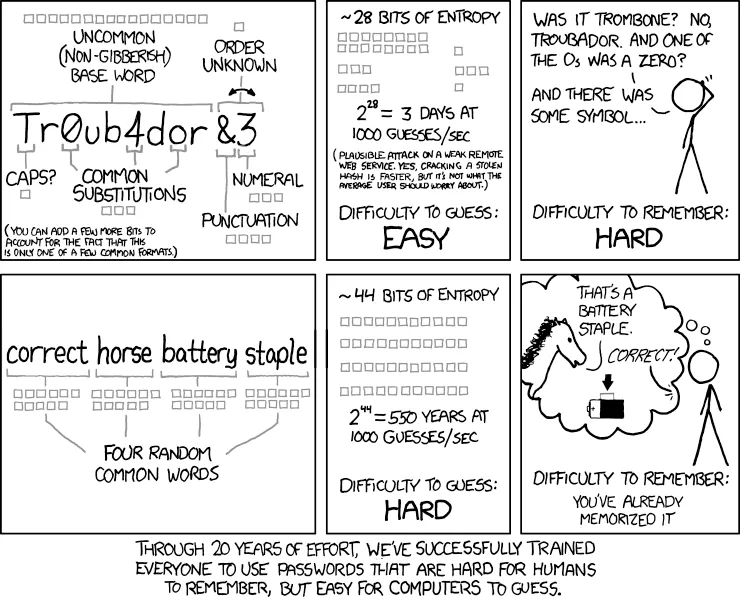
Instead of making complicated passwords that are hard to remember, it’s best to create long passwords that are easy for humans to remember, but hard for computers to guess. Though, I’d still say it’s a good idea to throw a symbol or number in there, to prevent dictionary attacks. A password such as c0rrecthors3batteryst@aple! might be a good compromise.
Step 2. Password Managers
While remembering one or two of these longer passwords might be easy enough, it would be difficult to remember one for each of the many online accounts we have. It might be tempting to just use this same secure password on every website, but if one site is hacked, all of your other accounts will also be compromised. One of the first things a hacker will do once cracking a password is to try that same username and password combination on other websites to see what else they can access.
Instead, we can use this secure password that we can remember as our “master password”: the key to a vault of all of our other passwords. A password manager will allow you to have long, complex, unique, and secure passwords for every single one of your online accounts while only having to remember your one master password. There are many services out there — such as Bitwarden, LastPass, 1Password, Dashlane, and NordPass — but they all have the same core function. Just try to stray away from the password manager built into your browser.
Your password manager will help you generate a long, random string of characters to use as a unique password for each of your online accounts. Then, when you log into your password manager with your master password, you can copy this unique password for the site you’re trying to access. Many password managers also have a browser extension and mobile apps to automatically fill in your password when it detects a login page.
While we might be putting all of our eggs in one basket, so to say, it’s much more secure than using the same password (or similar passwords) across all of our accounts. We just have to make sure our master password is very secure. What’s the best way to do this besides creating a strong password? 2FA.
Step 3. Two Factor Authentication
The last one of these simple steps, Two Factor Authentication (2FA) is key to keeping our online accounts secure. 2FA requires another form of authentication besides a password. This often comes in the form of a Time-based One Time Password (TOTP), which is a six-digit code that changes every 30 seconds. After you enter your password, you’ll be asked to enter this code from an app on your phone, and if it’s the right one, then the login will be successful.
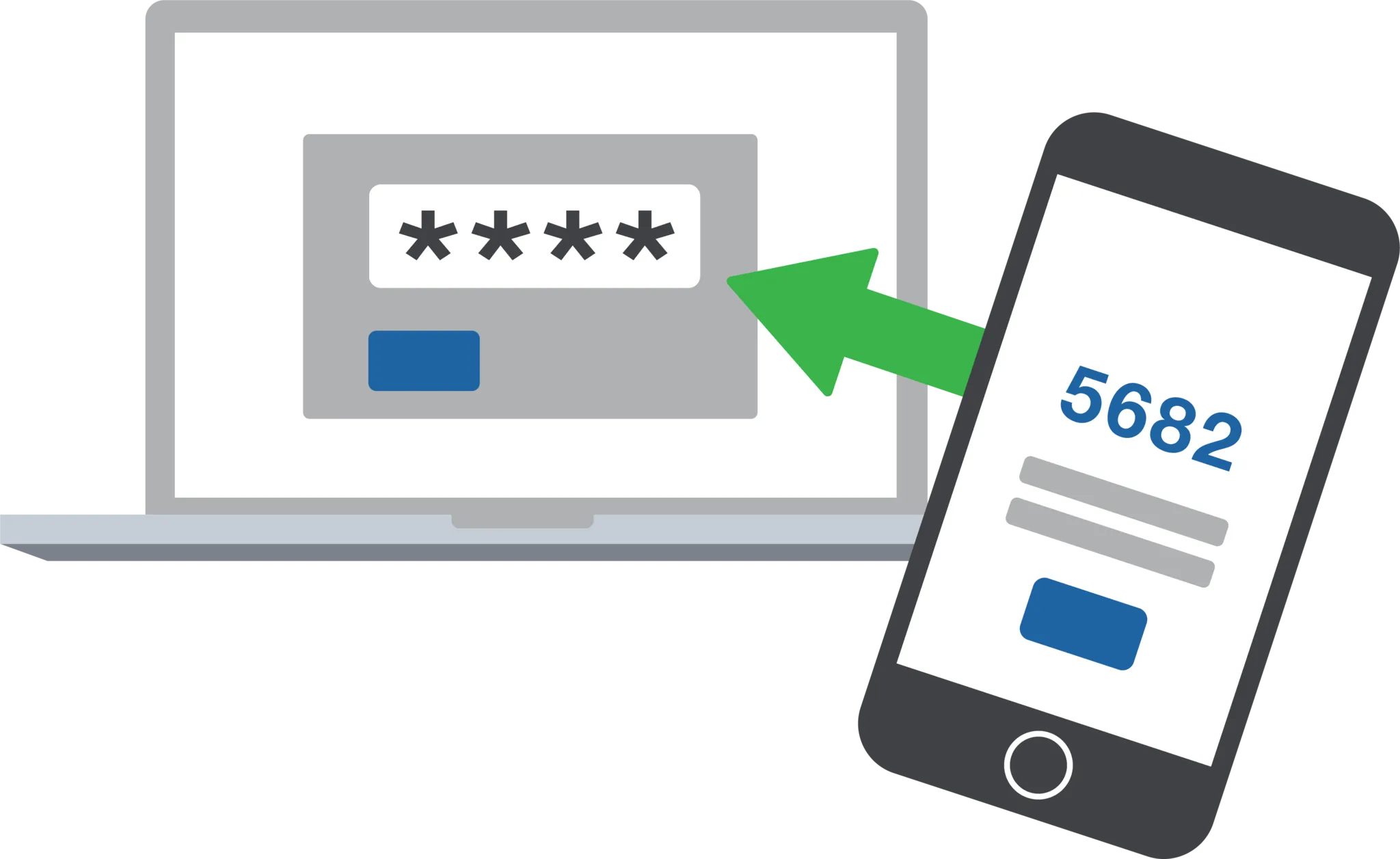
Some services may require you to use their special 2FA app, or send a notification to your phone that you have to approve. Even if you have the most secure password for a website that was generated from your password manager, the site could still have bad security and leak your password. But if you have 2FA enabled, you’d still be the only one that can access your accounts (but please still change your password in the case of a data breach).
There are lots of 2FA apps out there, and they all do just about the same thing. If you really want to protect yourself, stick to the open source apps out there that don’t sync with the cloud and handle backups yourself. But for everyone else, having 2FA in the first place already makes you more secure than 90% of people out there. Regardless, make sure to have some sort of backup in place with cloud-sync for the average person or manual for the more paranoid out there.
Also, be sure to enable 2FA on every account you can, especially your password manager. They should ask you to scan a QR code with your authenticator app of choice, and then enter the code to verify. Try to avoid from SMS-based 2FA where the website sends you a text with a code. Many times, a mix of social engineering and hacking magic will allow threat actors to gain access to your text messages.
Some Helpful Links
- Password Utilities: a tool I made to generate passwords and test their strength
- Bitwarden: my preferred password manager
- Have I Been Pwned?: check if your email or phone is in a data breach
- 2FA Apps for the average person: Google Authenticator or Microsoft Authenticator
- Open source 2FA Apps: Raivo OTP (this one is really neat) or Authenticator